The Terrascope MapProxy service provides both WMS and WMTS endpoints, optimised for products that require high zoom levels and overview imagery. It serves pre-rendered tiles and dynamically generated map images, making it ideal for visualising large-scale datasets at multiple resolutions.
Configuration
QGIS
To add the Terrascope MapProxy service to QGIS:
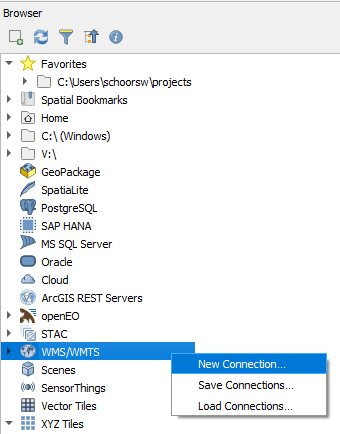
Open the Browser pane. If it is not visible, go to View > Panels > Browser Panel.
Locate WMS/WMTS in the tree, right-click it, and select New Connection…
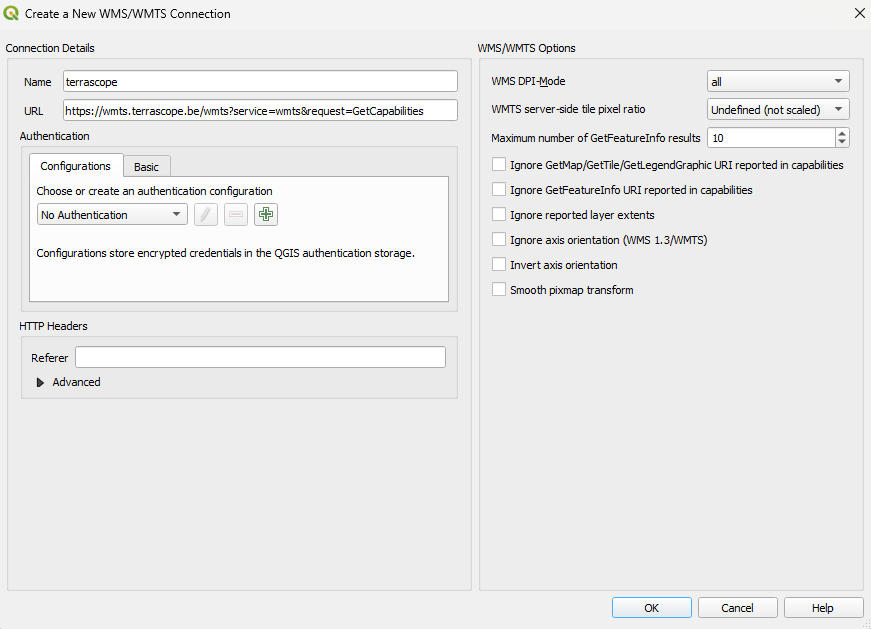
Enter one of the following URLs depending on the protocol you want to use, and click OK:
For WMTS:
https://mapproxy.terrascope.be/mapproxy/wmts/1.0.0/WMTSCapabilities.xml
For WMS:
https://mapproxy.terrascope.be/mapproxy/service?service=WMS&request=GetCapabilities
Expand the new connection under WMS/WMTS. Double-click a layer or drag it onto the map canvas to display it.
Authentication
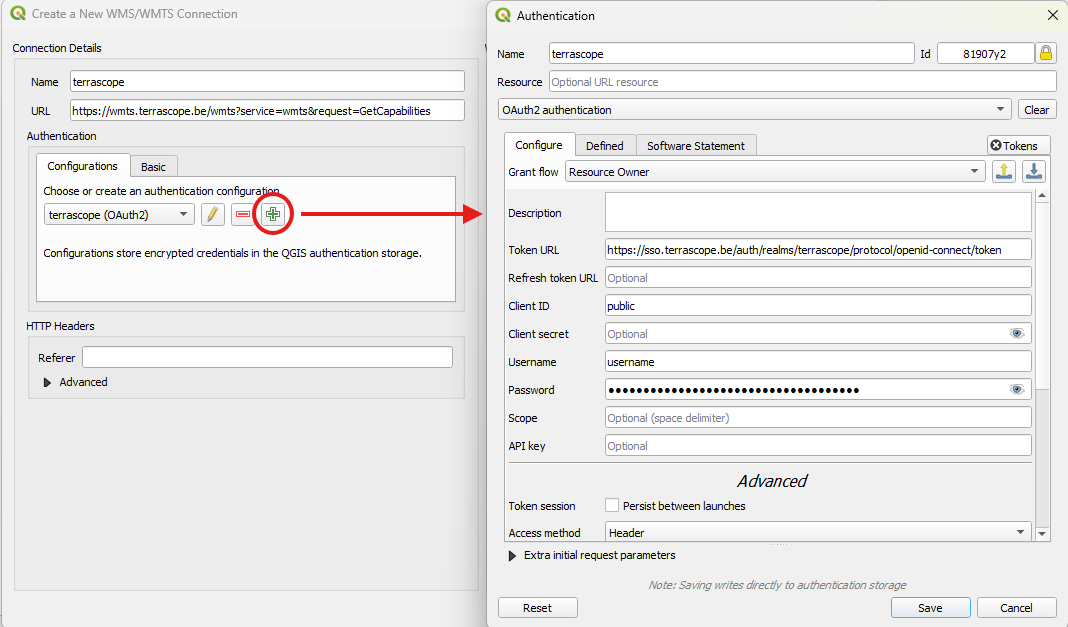
No authentication is required to access public MapProxy layers. To access restricted layers, add OAuth2 authentication when creating or editing the connection.
QGIS will display a prompt to create a master password if you have not set one up yet. This master password is used to securely store all your credentials.
First, click the Configuration tab in the authentication settings, then click the Add button to create a new authentication configuration. Select OAuth2 authentication as the authentication type from the dropdown. Now you can fill in the following details in the OAuth2 config window:
| Grant flow |
Resource Owner (from dropdown) |
| Token URL |
https://sso.terrascope.be/auth/realms/terrascope/protocol/openid-connect/token |
| Client ID |
public |
| Username |
your Terrascope username |
| Password |
your Terrascope password |
When to use MapProxy
The MapProxy service is particularly useful when:
- You need to visualise products at high zoom levels with smooth overview transitions.
- You want to leverage pre-rendered tile caches for fast rendering performance.
- You require both WMS and WMTS access to the same set of layers from a single service endpoint.
For standard Terrascope layers at default zoom levels, the regular WMS / WMTS service may be more appropriate.
LCM_2020
|
Property
|
Value
|
|
Spatial extent
|
[-180.0, -85.1, 180.0, 85.1]
|
|
Temporal extent
|
|
cop-dem-glo-90m-cog_dem
COPERNICUS DEM GLO-90m COG
|
Property
|
Value
|
|
Spatial extent
|
[-180.0, -85.1, 180.0, 85.1]
|
|
Temporal extent
|
|
esa-worldcover-map-10m-2020-v1_map
|
Property
|
Value
|
|
Spatial extent
|
[-180.0, -85.1, 180.0, 85.1]
|
|
Temporal extent
|
|
esa-worldcover-map-10m-2021-v2_map
|
Property
|
Value
|
|
Spatial extent
|
[-180.0, -85.1, 180.0, 85.1]
|
|
Temporal extent
|
|
esa-worldcover-ndvi-10m-2020-v1_ndvi
|
Property
|
Value
|
|
Spatial extent
|
[-180.0, -85.1, 180.0, 85.1]
|
|
Temporal extent
|
|
esa-worldcover-ndvi-10m-2021-v2_ndvi
|
Property
|
Value
|
|
Spatial extent
|
[-180.0, -85.1, 180.0, 85.1]
|
|
Temporal extent
|
|
esa-worldcover-s1vvvhratio-10m-2020-v1_vvvhratio
WORLDCOVER S1 VV/VH RATIO 2020
|
Property
|
Value
|
|
Spatial extent
|
[-180.0, -85.1, 180.0, 85.1]
|
|
Temporal extent
|
|
esa-worldcover-s1vvvhratio-10m-2021-v2_vvvhratio
WORLDCOVER S1 VV/VH RATIO 2021
|
Property
|
Value
|
|
Spatial extent
|
[-180.0, -85.1, 180.0, 85.1]
|
|
Temporal extent
|
|
esa-worldcover-s2rgbnir-10m-2020-v1_fcc
WORLDCOVER S2 RGB-NIR FCC 2020
|
Property
|
Value
|
|
Spatial extent
|
[-180.0, -85.1, 180.0, 85.1]
|
|
Temporal extent
|
|
esa-worldcover-s2rgbnir-10m-2020-v1_tcc
WORLDCOVER S2 RGB-NIR TCC 2020
|
Property
|
Value
|
|
Spatial extent
|
[-180.0, -85.1, 180.0, 85.1]
|
|
Temporal extent
|
|
esa-worldcover-s2rgbnir-10m-2021-v2_fcc
WORLDCOVER S2 RGB-NIR FCC 2021
|
Property
|
Value
|
|
Spatial extent
|
[-180.0, -85.1, 180.0, 85.1]
|
|
Temporal extent
|
|
esa-worldcover-s2rgbnir-10m-2021-v2_tcc
WORLDCOVER S2 RGB-NIR TCC 2021
|
Property
|
Value
|
|
Spatial extent
|
[-180.0, -85.1, 180.0, 85.1]
|
|
Temporal extent
|
|
esa-worldcover-swir-10m-2020-v1_swir
|
Property
|
Value
|
|
Spatial extent
|
[-180.0, -85.1, 180.0, 85.1]
|
|
Temporal extent
|
|
esa-worldcover-swir-10m-2021-v2_swir
|
Property
|
Value
|
|
Spatial extent
|
[-180.0, -85.1, 180.0, 85.1]
|
|
Temporal extent
|
|
Back to top