STAC Browser
Visualize and explore the Terrascope STAC API
Overview
The STAC Browser is a web-based tool for discovering and visualizing geospatial data from STAC (SpatioTemporal Asset Catalog) APIs. A STAC Browser instance is hosted at https://stacbrowser.terrascope.be that allows users to explore the collections and items available on the Terrascope platform. Authentication is integrated with the Terrascope platform, which allows users to download STAC items or browse private collections after logging in with their Terrascope credentials. The STAC Browser provides an intuitive interface for navigating through the metadata and assets of geospatial datasets found in the Terrascope STAC catalog.
Using the STAC browser
Browsing collections
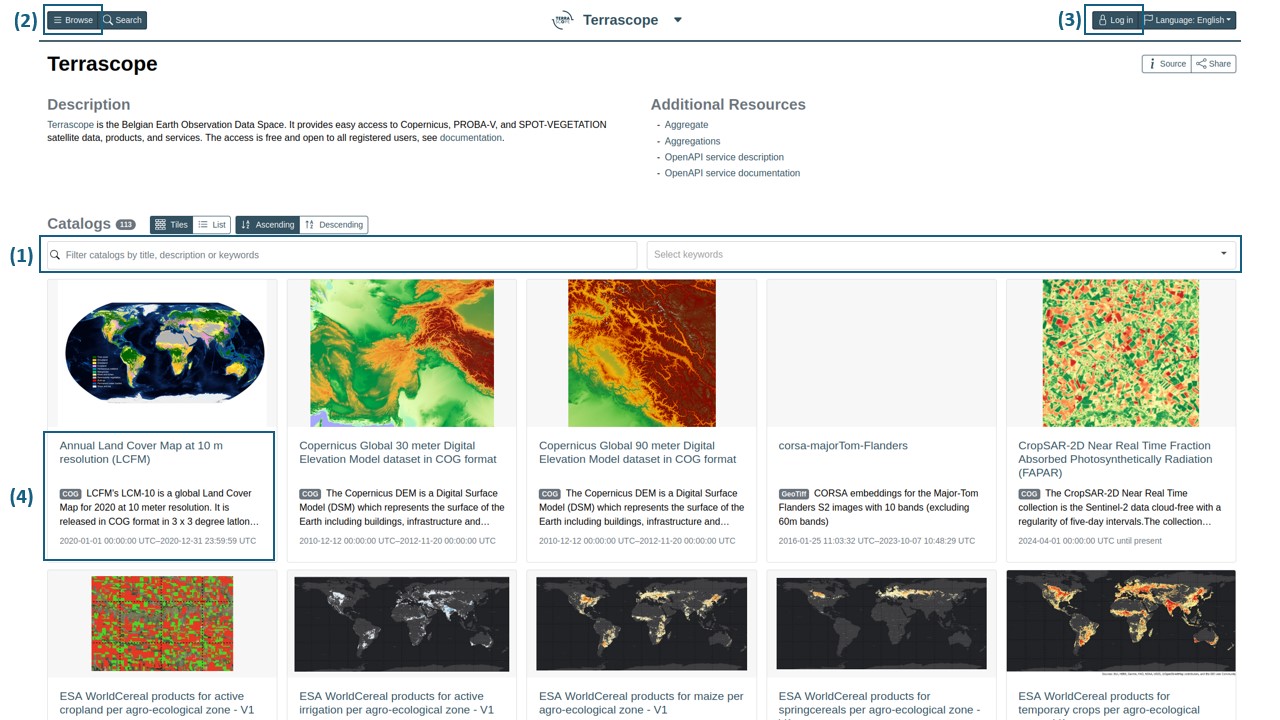
On the homepage of the STAC Browser, you can browse and filter through the available collections. The main features of the interface include:
- (1) Filter Collections: Filter available datasets in the UI. You can also search for specific collections using text or using collection keywords.
- (2) Browse Collections: Browse collections in a hierarchical structure by clicking ‘Browse’ in the top left corner.
- (3) Authentication: Log in with your Terrascope credentials to download items or browse private collections.
- (4) View Collection Details: Click on a collection to view its metadata, including a description, spatial and temporal extent, and available items.
Discovery within collections
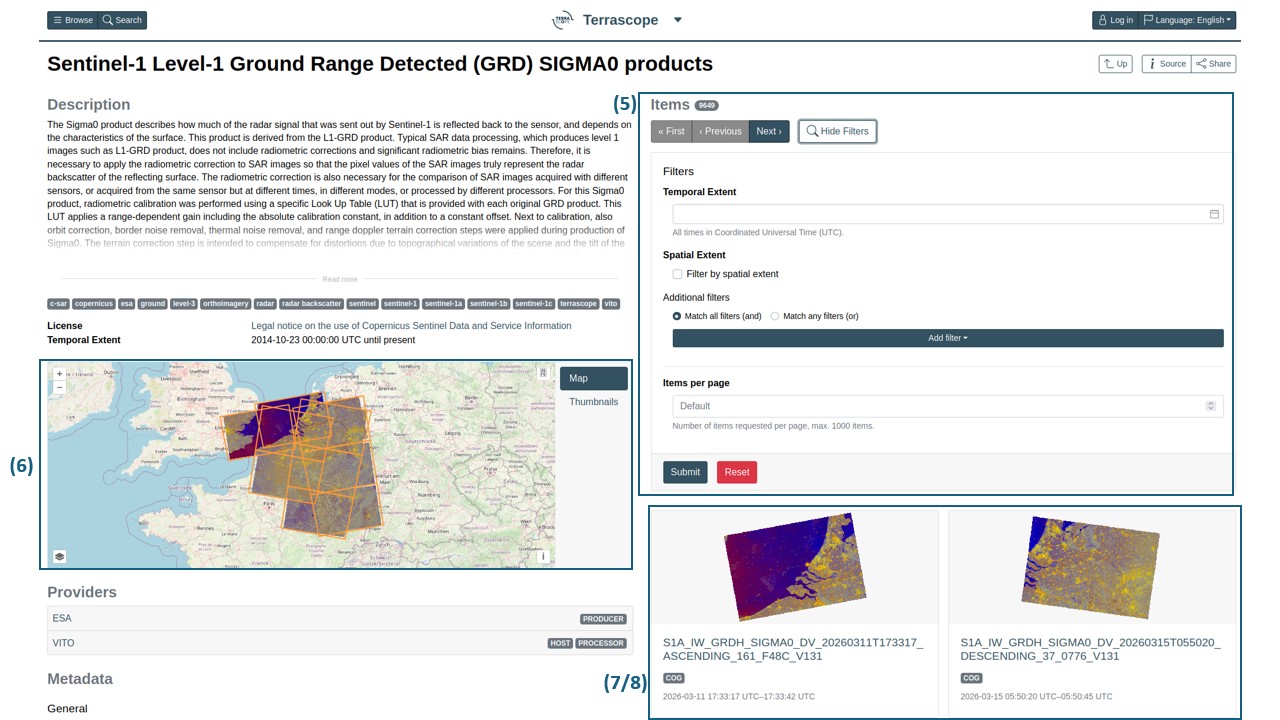
Once you click on a collection, you can further explore the items it contains:
- (5) Search Items: Filter items by spatial and temporal parameters.
- (6) Visualize: View geographic coverage and visualize previews (if available).
- (7) Metadata: Access detailed metadata for each item and its assets.
- (8) Export: Download item assets, which you can do once you are logged in. To download assets, click on the item you want to download. Under ‘Asset’ you can find all assets and their download urls. Here, You can also find the path to each item asset under the ‘local’ field in the asset metadata.
Alternative access methods
Bulk downloads
For downloading multiple items or automating data access, the STAC Browser’s web interface may not be the most efficient approach. Instead, users can use the pystac-client library to programmatically query and download data from the Terrascope STAC API. A comprehensive example on how to use pystac-client with the Terrascope STAC API is available in the Terrascope notebook samples repository. For detailed documentation on the Terrascope STAC API, including endpoints, authentication, and query parameters, please refer to the STAC API documentation.
Interactive Viewer
For interactive visualization and exploration of geospatial data, the Terrascope Viewer provides a powerful web-based interface. The Viewer complements the STAC Browser by offering advanced visualization, while the STAC Browser excels at metadata exploration and item discovery. In addition to visualization, the Viewer also supports data downloads, allowing users to export selected areas and time ranges directly from the interface without needing to browse through individual STAC items.